
Validate a feature
The merge requests of a single issue, grouped across every project, validated and merged together into the main branch.
Checked in the application on September 5, 2026
A feature touches three repositories: three merge requests, three GitLab tabs to check that each one is mergeable, and the risk of merging two out of three. The Features screen groups the merge requests open against the main branch by issue, says for each issue whether everything is ready, and merges them together in one click. It is the product owner’s screen: opened throughout the day, often to do nothing.
Who can Product ownerDeveloperManagerAdministrator
Everyone reads the list and the detail. Validating an issue, that is merging its merge requests, requires the product owner role at least. A developer validates too: the lock that matters is in GitLab (approvals, branch protections), not in Deployer.
Reading the list
Issues are grouped by board, the GitLab project carrying the tickets, one section per board when there are several. Within each section, the ready ones first, then the partial ones, then those pending; the section header counts the ready ones (“Infra / Core · 1 ready”).
An issue card carries the number, the number of merge requests, the aggregated state on the right, the title with its GitLab labels, and one chip per project touched, coloured by the state of its merge request: green ready, amber blocked, neutral not read yet.
| State | What characterises it |
|---|---|
| ready | All its merge requests are mergeable. The only actionable state. |
| 2/3 | At least one blocks. The figure says how many remain; the panel says which one and why. |
| pending | At least one is transient (GitLab computing, pipeline running), none blocks. It is not a fault. |
- Filter with the rail
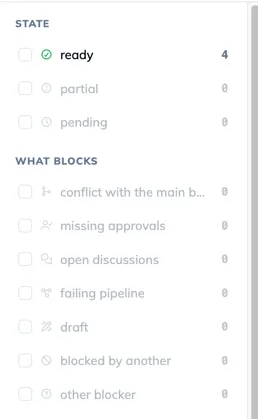
Seven axes, all checkboxes: Boards, State, What blocks (conflict, approvals missing, open discussions, pipeline failed, draft), Created by, Assigned to, GitLab labels, Code repository. OR within an axis, AND between axes; only GitLab labels combine with AND, as in GitLab. Each value shows what ticking it would give. “Unassigned” is pinned at the top of the assignees; “me” ticks your linked GitLab account.
- Search
The bar’s search covers the reference, the title, the project name and the merge request number. It combines with the rail. “Reset” clears everything. Filters live in the URL: a link shared during a review opens the same reading.
- Adjust the display
Two density settings, remembered from one session to the next: “Labels on cards” and “Projects on cards”. On a workspace that does not label its issues the projects clutter, on a single-repository workspace the labels do.

With an issue selected, the up and down arrows move to the previous and the next one. The selection survives a refresh and a filter change: the panel always recalls the board of the open issue.
The panel: the feature, then the mechanics
The panel reads top to bottom in the order of the decisions: what it is, is it finished, the action, and only then what it goes through.
- What it is: the board as a badge, the full reference (link to the GitLab issue), the title, the description rendered as in GitLab and truncated with “see more”, the author and the assignees (whom to ask), the opening date and the last activity. An issue with no activity for three weeks says so plainly: it is often the most useful information.
- Is it finished: one line in product owner language. “Ready to validate, 3 merge requests, 3 projects”. Or “2 of 3 are ready, frontend is awaiting an approval”. Or “Pending, GitLab is still working out this issue’s state”.
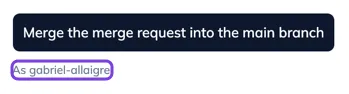
- The action: the “Merge the 3 merge requests into the main branch” button, disabled until the issue is ready, the line above saying why. Under the button, on whose behalf the merge will be done.
- The merge requests: one line per project, folded, with its number (link to GitLab) and its dot. What blocks is unfolded by default; what is ready stays folded.
| What GitLab says | What the line shows | Who lifts the block |
|---|---|---|
| mergeable | ready | nobody, it is fine |
| draft_status | draft | the author, who has to take it out of draft |
| not_approved | approvals missing | the approvers, in GitLab |
| ci_must_pass | pipeline failed | the author, with the link to the pipeline |
| ci_still_running | pipeline running | nobody, it will be read again |
| discussions_not_resolved | open discussions | the participants, in GitLab |
| conflict, need_rebase | conflict with the target | the author, with a rebase in GitLab |
| blocked_status | blocked by another merge request | merge the other one first |
| checking, unchecked | GitLab is computing | nobody, it will be read again |
GitLab’s raw status stays shown under the readable wording: it is the exact term to look for in the GitLab interface.
Validating
- Merge
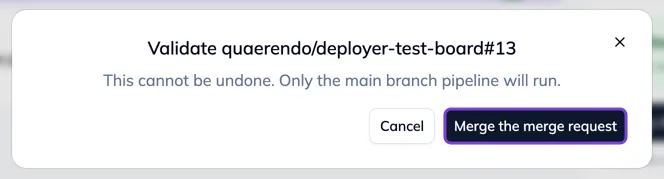
The button opens a confirmation listing the merge requests by number and project. It cannot be undone and it touches several repositories. Only the main branch pipeline will run: merging into the main branch rolls nothing out.
- On whose behalf
With your GitLab account linked, the merge carries your name and your rights: a protected branch may be refused to you. Without a linked account, the workspace may allow the fallback on the token’s account, and the panel says so, because the bot often bypasses the approvals shown just above. Without a link and without a fallback, the button points to “My GitLab account”.
- Afterwards
All merged: the issue leaves the list, and a message says so. Partial merge: what is merged stays merged, the refusals carry their raw reason, and replaying only picks up what is missing. A “pipeline running” refusal is not a failure: try again in a few minutes. A “the branch has moved” refusal is a protection: someone pushed since the read, read again.
Deployer does not close the issue: GitLab does if the merge requests carry “Closes”. What is merged is later read in the release notes.
Loading and freshness
Reading every open merge request of sixteen repositories costs close to a hundred GitLab calls and can take a minute. The waiting screen shows the phase and the progress: reading the projects, ticked one by one; analysing the merge requests (finding each one’s issue); reading the issues. The list then shows all at once, every issue pending, then the verdicts arrive in batches; a progress edge under the screen bar shows how far, and the rail signals that the State and What blocks counts are still moving.
When the workspace has enabled the Assembly module, each card carries one more dot: carried by or held back from the assembled branch, and the panel points to the candidate in the Assembly screen.